
Guess who's back? Breadcrumbs are making their return in Costpoint 2026.3!
If you've been working in the new Costpoint UI over the past several months, you may have noticed that one familiar navigation feature was missing: breadcrumbs. The good news is that they're officially back in Costpoint 2026.3, which began rolling out to many clients earlier this week and will continue to be released to additional customers throughout September and October.
What Are Breadcrumbs?
For those who may be unfamiliar with the term, breadcrumbs are the navigation path displayed at the top of the screen that shows exactly where you are within the application.
The breadcrumb trail displays:
- Domain
- Module
- Application Name
This seemingly small enhancement can make a big difference in your day-to-day experience.
Why Breadcrumbs Matter
Breadcrumbs provide valuable context as you navigate through Costpoint and can significantly improve collaboration and documentation efforts.
Some key benefits include:
Easier Team Collaboration
When working with colleagues, support teams, or consultants, breadcrumbs make it simple to explain exactly where you are in the system.
Rather than saying, "I'm on the employee setup screen," you can quickly reference the full navigation path, ensuring everyone is looking at the same place.
Improved Documentation
Creating process documentation, SOPs, training guides, and screenshots becomes much easier when the navigation path is clearly visible. Users can follow instructions more confidently and quickly locate the correct application.
Better Navigation Awareness
The breadcrumb trail provides immediate visibility into your location within Costpoint, helping you maintain orientation as you move between modules and applications.
How to Enable Breadcrumbs
Turning on breadcrumbs is quick and easy:
- Click your Profile Icon in the upper-right corner of Costpoint.
- Open your Profile Information.
- Locate the Navigation section.
- Check the box for Show Breadcrumb Trail.
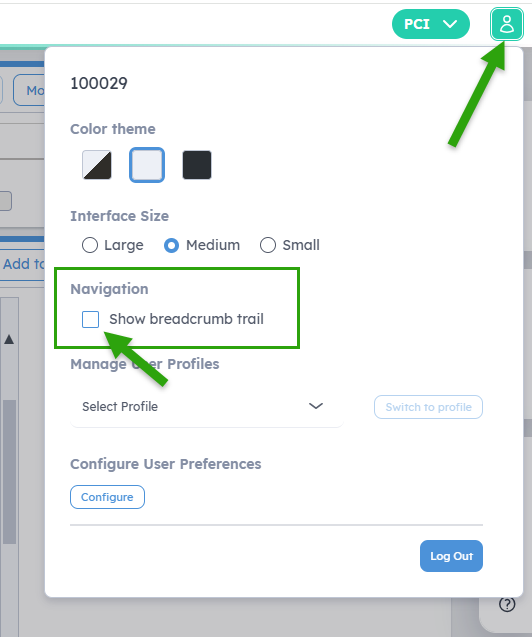
Once enabled, breadcrumbs will appear whenever you are working within Costpoint.
Important Note
The breadcrumb setting is currently a user-level preference.
This means:
- Each individual user must enable it for themselves.
- It cannot be enabled globally for all users at this time.
Organizations looking to leverage this feature should communicate the steps to their users so they can opt in individually.
Explore What's New in Costpoint 2026.3
The return of breadcrumbs is just one of several enhancements included in Costpoint 2026.3. As organizations continue adopting the new UI, these usability improvements help create a more intuitive and efficient user experience.
If you have questions about enabling breadcrumbs, navigating the new UI, or learning more about the enhancements available in Costpoint 2026.3, don't hesitate to reach out to the PCI team. We're happy to help you get the most out of the latest Costpoint release.
Welcome back, breadcrumbs. We've missed you!