
Make Better Decisions With WorkBook Intelligence Dashboards

November 18, 2022

Deltek Vantagepoint’s contract management tools help architecture and engineering firms centralize contract documents, automate key workflows, and maintain compliance, all within a single ERP platform. The result: fewer administrative bottlenecks, stronger financial oversight, and more time focused on billable work.

Managing contracts is one of the most detail-intensive responsibilities in any architecture or engineering firm. Missed terms, misplaced documents, and manual tracking create costly delays and in project-driven environments, those delays compound fast. Deltek Vantagepoint addresses this head-on with a dedicated contract management framework built specifically for A&E firms.

What Is Contract Management in Deltek Vantagepoint?

Deltek Vantagepoint’s contract management module centralizes all contract-related activity within the same platform your team already uses for project management, accounting, and resource planning. Rather than toggling between spreadsheets, shared drives, and email chains, your team accesses every contract document, amendment, and approval in one place.

Key capabilities include:

  • Contract document storage: Attach and organize executed contracts, amendments, and supporting documentation directly to project records
  • Contract type configuration: Define contract structures, lump sum, cost-plus, time and materials—and align billing rules accordingly
  • Amendment tracking: Log and manage contract modifications with a clear audit trail
  • Compliance visibility: Monitor contract terms against actuals to flag potential overruns or scope discrepancies early

How Contract Documents Work Inside Deltek Vantagepoint

Contract documents in Deltek Vantagepoint are linked directly to project records, which means the information lives where the work happens. When a project manager needs to verify a billing cap, check a deliverable deadline, or confirm a client requirement, that information is accessible without hunting through external systems.

This tight integration between contract documents and project financials creates a direct line between what was agreed upon and what is being executed. Project managers and accounting teams work from the same source of truth, eliminating version confusion and reducing the risk of billing errors tied to outdated contract terms.

Why This Matters for Architecture and Engineering Firms

A&E firms operate across multiple contracts simultaneously, often with layered sub-consultant agreements and phased deliverables. Without a structured system, tracking contract status across a portfolio of projects becomes unmanageable.

Deltek Vantagepoint brings order to that complexity. Contract terms inform billing workflows, approval thresholds, and revenue recognition, automatically. This means your team spends less time reconciling data and more time delivering on project commitments.

The Business Value of Streamlined Contract Management

The operational benefits of Deltek Vantagepoint’s contract management tools extend well beyond document storage. Firms that structure their contracts within Vantagepoint gain:

  • Faster invoice cycles: Billing rules tied to contract terms reduce the back-and-forth between project managers and accounting
  • Stronger financial visibility: Real-time data on contract value, billed amounts, and remaining budget supports proactive decision-making
  • Audit readiness: A centralized document repository with version history makes internal reviews and external audits significantly more straightforward
  • Reduced compliance risk: Automated alerts and structured contract records help firms stay aligned with client requirements and regulatory obligations

For C-level executives and project leaders, these capabilities translate directly to improved cash flow, fewer write-offs, and greater confidence in financial reporting.

Getting the Most Out of Vantagepoint Contract Tools

Deltek Vantagepoint’s contract management features deliver the most value when they are configured to match your firm’s specific contract types, billing structures, and approval workflows. Out-of-the-box functionality provides a strong foundation, but firms that invest in proper setup, and ongoing optimization, see the clearest gains in efficiency and financial performance.

This is where working with an experienced Deltek partner makes a measurable difference. Proper configuration ensures your contract data flows accurately through project financials, reducing the manual corrections that drain time and introduce risk.

Make Contract Management Work for Your Firm

Deltek Vantagepoint gives architecture and engineering firms the tools to manage contracts with precision, transparency, and confidence. When your contract documents are integrated with your project and financial data, your entire team operates from a stronger, more reliable position.

At PCI, we help firms configure and optimize Deltek Vantagepoint to match how they actually work, so the platform supports your operations rather than complicates them. We make your operations comfortable.

Ready to see what streamlined contract management looks like for your firm? Contact PCI today to connect with a Deltek specialist.


Frequently Asked Questions

What types of contracts does Deltek Vantagepoint support?
Deltek Vantagepoint supports multiple contract types, including lump sum, time and materials, and cost-plus structures. Each type can be configured with corresponding billing rules and financial controls.

Can contract documents be attached directly to projects in Deltek Vantagepoint?
Yes. Deltek Vantagepoint allows users to attach executed contracts, amendments, and supporting documents directly to project records, keeping all relevant information in a single, accessible location.

How does Deltek Vantagepoint help with contract compliance?
Deltek Vantagepoint tracks contract terms against project actuals in real time, enabling firms to identify potential overruns or scope discrepancies before they become financial or legal issues.

Do I need a Deltek partner to set up contract management in Vantagepoint?
While basic features are accessible out of the box, working with a certified Deltek partner like PCI ensures your contract management setup is properly configured for your firm’s specific workflows, contract types, and billing structures.

Being the decision maker for your business isn’t always the most comfortable role. But for agencies who want to grow or mature as a business, whether that be for acquisition or not, the kinds of decisions that need to be made are of greater importance and have a significant impact. For these agencies, it is crucial they take their business intelligence (BI) reporting to the next level. To accomplish this enhanced level of analytics, decision makers sometimes turn to out-of-the-box BI tools to translate large volumes of data into generic insights, but too often they must spend additional effort translating that into what works for their agency’s specific needs.

But with Deltek WorkBook Intelligence, decision makers can improve reporting with customizable dashboards that fit their agency’s specific needs without the hassle of gathering and translating gobs of data into something useable. WorkBook Intelligence makes it easier to discover actionable insights that lead to better decisions for growth.

As part of the total agency management solution, WorkBook Intelligence includes several standard dashboards that provide valuable analysis of agency KPIs.

Client Analysis Dashboard

The Client Analysis dashboard is useful for comparing the relative performance of clients and the margin that each client is delivering.

This dashboard provides an overview of the sales and profit attributed to clients based on the jobs contained within that client record. The available filters allow you to refine the specific client or group of clients on which you want to get analysis. The analysis provided shows the sales values of costs incurred and the associated profit of those costs.

Jobs Analysis Dashboard

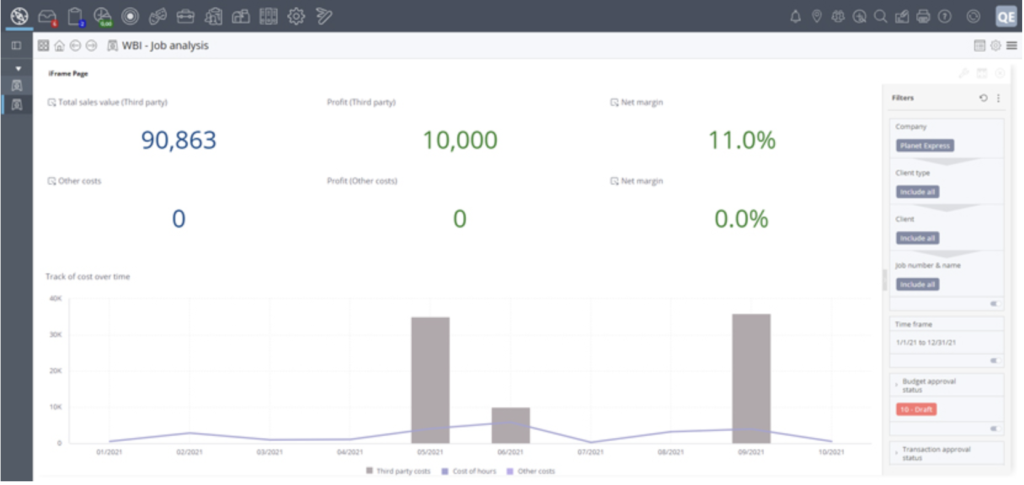
The Jobs Analysis dashboard is best used to compare the relative performance of multiple jobs to identify anomalies or outliers and, once identified, to drill down into the specific detail of those jobs to the transaction level to pinpoint potential problems or issues that require action.

This dashboard provides an overview of the sales and profit attributed to jobs and enables you to compare the performance of jobs relative to each other, either across the entire Company or within a selected client or clients, depending on the filters that you apply. The available filters allow you to further refine the nature of data to analyze, based on the status of the jobs or the approval status of the transactions within them. The widgets on the dashboard show the sales values of costs incurred and the associated profit of those costs.
Finance – All Years Dashboard

The Finance – All Years dashboard is useful for agencies that are part of a network with different offices or companies sharing the same WorkBook solution. It shows an overview of the financial results of a single selected Company across all finance years in your WorkBook system, as it enables you to filter one Company at a time. It displays numeric data in the Company currency of that selected Company.

Finance – Single Year Dashboard

The Finance – Single Year dashboard is similar in that it is meant to show the financial data of a single company within a network of agencies. This dashboard shows an overview of the financial results of a single selected Company for a single selected financial year. Again, it displays numeric data in the Company currency of that selected Company.

CRM Dashboard

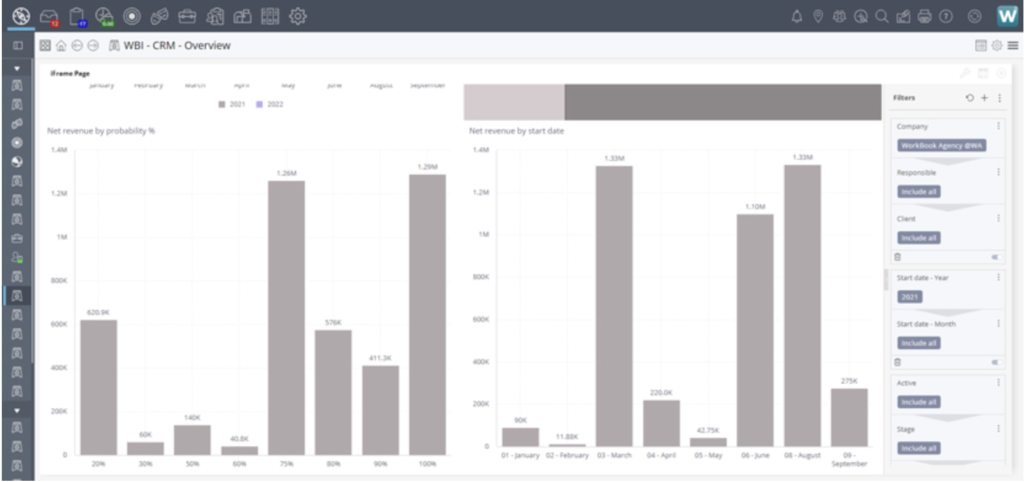
The CRM dashboard provides an overview of the value of pipelines on clients and prospects within your WorkBook system. An extensive range of filters gives you the ability to remove unwanted detail and focus on pipelines for specific clients, time periods, statuses, and levels of progression.

Data is shown both in a “full value” state and with the consideration of any probability that might have been applied, which means you can see a weighted total of pipelines, based on their respective probabilities which has an impact on expected revenue. All values are displayed in the Company currency of the selected Company.
Resourcing Dashboard

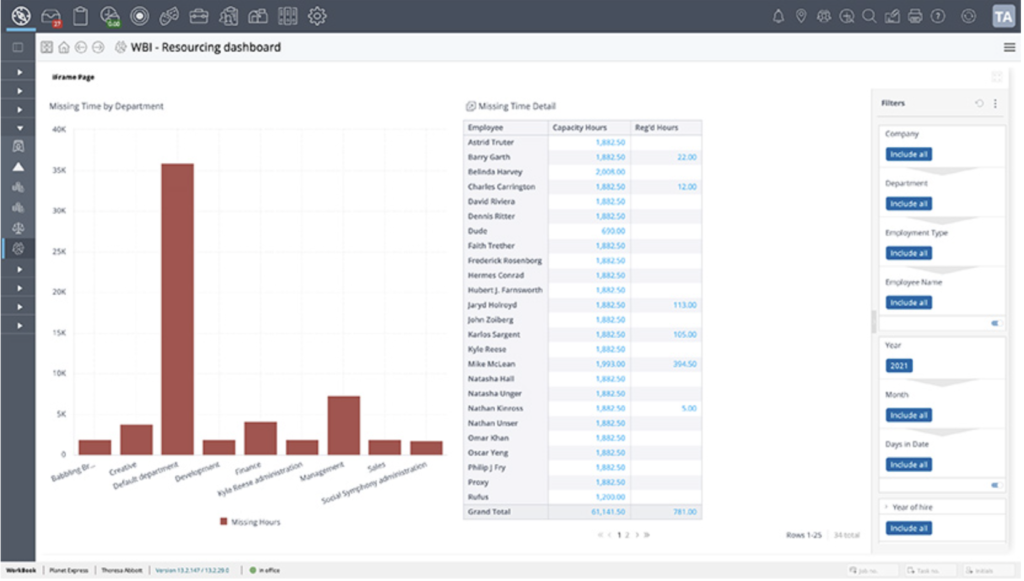
You can use the Resourcing dashboard to identify individuals, or groups of employees—for example, in departments—who have limited available capacity relative to the scheduled bookings made against them, or who have outstanding timesheets relative to their total capacity. For this dashboard, a large number of filters are available, including the ability to filter on more than a single Company, by department, or by employment type.
Create your own WorkBook Intelligence Dashboards with a Designer License

For agencies that are ready to elevate their business intelligence and need dashboards that provide insights not found in the standard offering, a Designer License allows you to create your own WorkBook Intelligence dashboards using the predefined data models provided.

With a Designer license you can:

  • Create a dashboard on the Analytics tab of the WorkBook Intelligence Design page.
  • Create and edit dashboard controls in the header ribbon when a dashboard is in Design mode.
  • Customize a dashboard’s layout by rearranging the widgets that are part of the dashboard.
  • Create nested dashboards that are suitable for drilling down into the detail of widgets on a dashboard.
  • Use filters to show only the data you want to be shown.
  • Copy, export, import, and delete dashboards.

Subscribe To Our Industry Newsletters

PCI triangle brand
PCI radial arrows brand

Further Reading…